PHP实例:基于PHP实现用户注册登录功能
《PHP实例:基于PHP实现用户注册登录功能》要点:
本文介绍了PHP实例:基于PHP实现用户注册登录功能,希望对您有用。如果有疑问,可以联系我们。
本文介绍的是基于PHP实现用户注册登录功能,本项目分为四部分内容:1前端页面制作,2验证码制作,3实现注册登陆,4功能完善.具体情况可以往下看.
PHP学习
验证码制作
PHP学习
一、实验简介
PHP学习
本次实验将会带领大家使用面向对象的思想封装一个验证码类.并在注册和登陆界面展示使用.通过本次实验的学习,你将会领悟到 PHP 的 OOP 思想,以及 GD 库的使用,验证码生成.
PHP学习
1.1 涉及到的知识点
PHP学习
- PHP
- GD库
- OOP编程
1.2 开发工具
PHP学习
sublime,一个方便快速的文本编辑器.点击桌面左下角: 应用程序菜单/开发/sublime
PHP学习
二、封装验证码类
PHP学习
2.1 建立目录以及准备字体
PHP学习
在 web 目录下建立一个 admin 目录作为我们的后台目录,存放后台代码文件.在 admin 下建立一个 fonts 目录,用于存放制作验证码所需字体.
PHP学习
在 admin 下新建一个 Captcha.php 文件,这就是我们需要编辑的验证码类文件.
PHP学习
当前目录层次结构: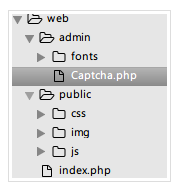 PHP学习
PHP学习
编辑 Captcha.php 文件:
PHP学习
<?php
/**
* Captcha class
*/
class Captcha
{

  function __construct()
  {
    # code...
  }
}
添加该类的私有属性和构造方法:
PHP学习
<?php
/**
* Captcha class
*/
class Captcha
{
  private $codeNum;  //验证码位数
  private $width;  //验证码图片宽度
  private $height;  //验证码图片高度
  private $img;  //图像资源句柄
  private $lineFlag;  //是否生成干扰线条
  private $piexFlag;  //是否生成干扰点
  private $fontSize;  //字体大小
  private $code;  //验证码字符
  private $string;  //生成验证码的字符集
  private $font;  //字体
  function __construct($codeNum = 4,$height = 50,$width = 150,$fontSize = 20,$lineFlag = true,$piexFlag = true)
  {
    $this->string = 'qwertyupmkjnhbgvfcdsxa123456789';  //去除一些相近的字符
    $this->codeNum = $codeNum;
    $this->height = $height;
    $this->width = $width;
    $this->lineFlag = $lineFlag;
    $this->piexFlag = $piexFlag;
    $this->font = dirname(__FILE__).'/fonts/consola.ttf';
    $this->fontSize = $fontSize;
  }
}
字体文件可通过以下命令下载到 fonts 目录:PHP学习
$ wget http://labfile.oss.aliyuncs.com/courses/587/consola.ttf
PHP学习
接下来开始编写具体的方法:PHP学习
创建图像资源句柄
PHP学习
//创建图像资源
public function createImage(){
    $this->img = imagecreate($this->width, $this->height);  //创建图像资源
    imagecolorallocate($this->img,mt_rand(0,100),mt_rand(0,100),mt_rand(0,100));  //填充图像背景(使用浅色)
  }
用到的相关函数PHP学习
- imagecreate:新建一个基于调色板的图像
- imagecolorallocate:为一幅图像分配颜色
- mt_rand:生成更好的随机数
创建验证码字符串并输出到图像
PHP学习
//创建验证码
public function createCode(){
    $strlen = strlen($this->string)-1;
    for ($i=0; $i < $this->codeNum; $i++) {
      $this->code .= $this->string[mt_rand(0,$strlen)];  //从字符集中随机取出四个字符拼接
    }
     $_SESSION['code'] = $this->code;  //加入 session 中

   //计算每个字符间距
    $diff = $this->width/$this->codeNum;
    for ($i=0; $i < $this->codeNum; $i++) {
          //为每个字符生成颜色(使用深色)
     $txtColor = imagecolorallocate($this->img,mt_rand(100,255),mt_rand(100,255),mt_rand(100,255));
     //写入图像
      imagettftext($this->img, $this->fontSize, mt_rand(-30,30), $diff*$i+mt_rand(3,8), mt_rand(20,$this->height-10), $txtColor, $this->font, $this->code[$i]);
    }
  }
用到的相关函数PHP学习
- imagecreate:新建一个基于调色板的图像
- imagecolorallocate:为一幅图像分配颜色
- mt_rand:生成更好的随机数
创建验证码字符串并输出到图像
PHP学习
//创建验证码
public function createCode(){
    $strlen = strlen($this->string)-1;
    for ($i=0; $i < $this->codeNum; $i++) {
      $this->code .= $this->string[mt_rand(0,$strlen)];  //从字符集中随机取出四个字符拼接
    }
     $_SESSION['code'] = $this->code;  //加入 session 中

   //计算每个字符间距
    $diff = $this->width/$this->codeNum;
    for ($i=0; $i < $this->codeNum; $i++) {
          //为每个字符生成颜色(使用深色)
     $txtColor = imagecolorallocate($this->img,mt_rand(100,255),mt_rand(100,255),mt_rand(100,255));
     //写入图像
      imagettftext($this->img, $this->fontSize, mt_rand(-30,30), $diff*$i+mt_rand(3,8), mt_rand(20,$this->height-10), $txtColor, $this->font, $this->code[$i]);
    }
  }
用到的相关函数:PHP学习
- imagettftext:用 TrueType 字体向图像写入文本
创建干扰线条
PHP学习
//创建干扰线条(默认四条)
public function createLines(){
    for ($i=0; $i < 4; $i++) {
      $color = imagecolorallocate($this->img,mt_rand(0,155),mt_rand(0,155),mt_rand(0,155));  //使用浅色
      imageline($this->img,mt_rand(0,$this->width),mt_rand(0,$this->height),mt_rand(0,$this->width),mt_rand(0,$this->height),$color);
    }
  }
用到的相关函数:PHP学习
- imageline:画一条线段
创建干扰点
PHP学习
//创建干扰点 (默认一百个点)
public function createPiex(){
    for ($i=0; $i < 100; $i++) {
      $color = imagecolorallocate($this->img,mt_rand(0,255),mt_rand(0,255),mt_rand(0,255));
      imagesetpixel($this->img,mt_rand(0,$this->width),mt_rand(0,$this->height),$color);
    }
  }
使用的相关函数:PHP学习
- imagesetpixel:画一个单一像素
对外输出图像:
PHP学习
 public function show()
  {
    $this->createImage();
    $this->createCode();
    if ($this->lineFlag) {  //是否创建干扰线条
      $this->createLines();
    }
    if ($this->piexFlag) {  //是否创建干扰点
      $this->createPiex();
    }
    header('Content-type:image/png');  //请求页面的内容是png格式的图像
    imagepng($this->img);  //以png格式输出图像
    imagedestroy($this->img);  //清除图像资源,释放内存
  }
用到的相关函数:PHP学习
- imagepng:以 PNG 格式将图像输出到浏览器或文件
- imagedestroy:销毁一图像
对外提供验证码:
PHP学习
public function getCode(){
    return $this->code;
  }
完整代码如下:
<?php
/**
* Captcha class
*/
class Captcha
{
  private $codeNum;
  private $width;
  private $height;
  private $img;
  private $lineFlag;
  private $piexFlag;
  private $fontSize;
  private $code;
  private $string;
  private $font;
  function __construct($codeNum = 4,$height = 50,$width = 150,$fontSize = 20,$lineFlag = true,$piexFlag = true)
  {
    $this->string = 'qwertyupmkjnhbgvfcdsxa123456789';
    $this->codeNum = $codeNum;
    $this->height = $height;
    $this->width = $width;
    $this->lineFlag = $lineFlag;
    $this->piexFlag = $piexFlag;
    $this->font = dirname(__FILE__).'/fonts/consola.ttf';
    $this->fontSize = $fontSize;
  }
  public function createImage(){
    $this->img = imagecreate($this->width, $this->height);
    imagecolorallocate($this->img,mt_rand(0,100),mt_rand(0,100),mt_rand(0,100));
  }
  public function createCode(){
    $strlen = strlen($this->string)-1;
    for ($i=0; $i < $this->codeNum; $i++) {
      $this->code .= $this->string[mt_rand(0,$strlen)];
    }
    $_SESSION['code'] = $this->code;
    $diff = $this->width/$this->codeNum;
    for ($i=0; $i < $this->codeNum; $i++) {
      $txtColor = imagecolorallocate($this->img,mt_rand(100,255),mt_rand(100,255),mt_rand(100,255));
      imagettftext($this->img, $this->fontSize, mt_rand(-30,30), $diff*$i+mt_rand(3,8), mt_rand(20,$this->height-10), $txtColor, $this->font, $this->code[$i]);
    }
  }
  public function createLines(){
    for ($i=0; $i < 4; $i++) {
      $color = imagecolorallocate($this->img,mt_rand(0,155),mt_rand(0,155),mt_rand(0,155));
      imageline($this->img,mt_rand(0,$this->width),mt_rand(0,$this->height),mt_rand(0,$this->width),mt_rand(0,$this->height),$color);
    }
  }
  public function createPiexs(){
    for ($i=0; $i < 100; $i++) {
      $color = imagecolorallocate($this->img,mt_rand(0,255),mt_rand(0,255),mt_rand(0,255));
      imagesetpixel($this->img,mt_rand(0,$this->width),mt_rand(0,$this->height),$color);
    }
  }
  public function show()
  {
    $this->createImage();
    $this->createCode();
    if ($this->lineFlag) {
      $this->createLines();
    }
    if ($this->piexFlag) {
      $this->createPiexs();
    }
    header('Content-type:image/png');
    imagepng($this->img);
    imagedestroy($this->img);
  }
  public function getCode(){
    return $this->code;
  }
}
以上就是验证码类的全部代码.看起来确实挺简单的,不过用的图像处理函数比较多,上面相关的函数我也做了必要的链接和用途说明.这些函数也不用死记硬背,遇到不清楚的,随时查阅 PHP 官方文档,最重要的是还有中文文档.
PHP学习
2.2 使用验证码
PHP学习
既然已经封装完毕,那就可以开始使用了.这里为了方便,直接在 Captcha 类的下方调用该类:
PHP学习
session_start(); //开启session
$captcha = new Captcha();  //实例化验证码类(可自定义参数)
$captcha->show();  //调用输出
三、前端展示
PHP学习
后端已经准备好了验证码,前端界面就可以展示了,修改 index.php 中的注册与登陆表单的验证码部分:
PHP学习
<div class="form-group">
 <div class="col-sm-12">
   <img src="admin/Captcha.php" alt="" id="codeimg" onclick="this.src = 'admin/Captcha.php?'+Math.random();">
   <span>Click to Switch</span>
 </div>
</div>
img 标签添加了点击事件的 js 代码,这样就可以实现点击更换验证码的功能!
PHP学习
效果图:PHP学习
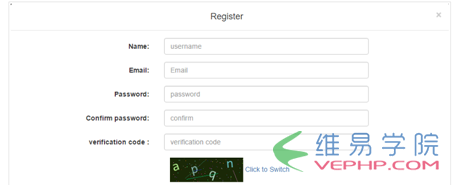
PHP学习
四、完善
PHP学习
到目前为止,我们的验证码模块基本就完成了.学习到这里,大家应该对面向对象编程有了进一步的理解.也领悟到了一丝 OOP 思想.OOP 的三大特征:封装,继承,多态.我们这里只用到了一点封装的思想.大家可以继续完善和改进这个验证码类,设计出更加完美的类.这个实验也告诉我们,PHP 的函数很多,不要死记硬背,多看官方文档.
PHP学习
转载请注明本页网址:
http://www.vephp.com/jiaocheng/3048.html
同类教程排行
- PHP如何把图片base64转为buff
- qhQrCodeReader组件:PHP
- PHP用curl采集时,出现Recv f
- LINUX PHP7如何把curl扩展的
- PHP学习:利用PHP_XLSXWrit
- error 35: SSL connec
- NOTICE: PHP message:
- PHPStorm2017.1.1怎么去掉
- PHP集成环境phpstudy启动时80
- PHP错误imagecreatefrom
- php错误imagecreatefrom
- 怎样把phpstorm(或Intelli
- PHP7新增的NULL合并运算符??和?
- 防跨站提交和PHP伪造来源referer
- php保存图片时报错warning:im